

Screening agent
Re-screens every party whose last check has run out against the sanctions and PEP lists. A new match becomes a new item for a person.
Opens My inbox
Most important first
Keep the screening, ID and company data you already pay for, from LSEG and LexisNexis to GBG and Companies House. Every result lands on the customer's case. Zenoo does the legwork, and your analyst makes the call.
clear as a false positive.
2 sourcesYou chose clear as a false positive. Status set to Clear.
This is Compliance Hub, with fictional data. Click anything.Compliance Hub, fictional data. Tap anything.
| Item | Client | Case | Due | Effort | Owner |
|---|
How Zenoo works
Most teams run checks with several vendors, keep customer data in their own systems, and copy the results into a case by hand. Zenoo connects all of it, so every result lands on one case and whatever needs a person comes to one inbox.
Risk servicesFrom the Marketplace
Your customer and your systems
My inbox3
Zenoo suggests. You decide.
Identity, screening, company, bank and fraud providers from the Marketplace, plus your own CRM and core banking, all report into one case. Bring the providers you already use, or pick new ones.
Browse the MarketplaceCustomer journeys ask for what is still missing, such as a document, a selfie, or proof of address, and the answers go straight onto the case.
See customer journeysYour team works from one inbox, and the evidence, the discussion, and the decision sit on the same case. Zenoo suggests. You decide.
See the Compliance HubAnswers once
On their phone
Collect
Send each party a link in your brand, by email, or bring answers in from your own onboarding through the API. Either way it is one joined-up journey: company details come from the register, the customer only checks them, and every answer lands on the case as it arrives.
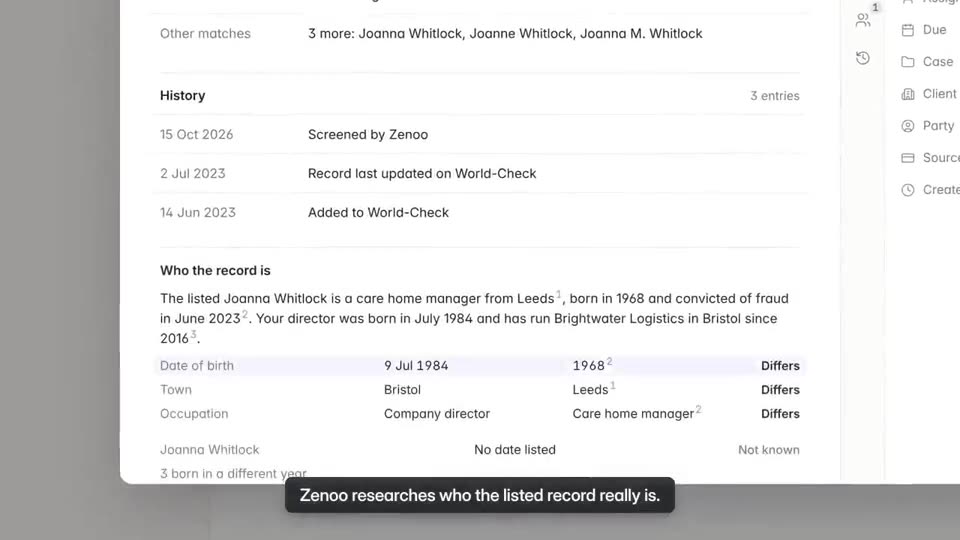
Does the research first
Observability
Zenoo does the research. It reads the record, compares it with what your customer told you, and chases what is missing. Every suggestion shows where it came from, and nothing is approved while a check is still open.
In the inboxOn the caseOvernight
Zenoo reads the record, the list entry, and the application, then sets out where they agree and where they differ.
agrees
2 Nov 1968 vs 19 May 1964
Sweden vs Denmark
PEP list, application
One line, in plain words, with its sources. Your team picks the step, and the reason is kept on the case.
Approve is locked while any check is open, and pressing it lists what is missing by the party it belongs to.
While you sleep
Overnight, Zenoo re-screens, chases and reads, so the morning starts prepared. Your team still makes every call.
Re-screens every party whose last check has run out against the sanctions and PEP lists. A new match becomes a new item for a person.
Finds customers who have gone quiet on a request and sends the reminder, so documents arrive before your team does.
Reads the evidence on each new item and leaves one line saying what it found and where.
Retries a failed provider call with backoff. If it still fails, the check does not pass: it goes to a person with the reason.
When a customer starts an identity check and goes quiet, it pulls the result one last time before marking the check failed.
Watches every open item against its deadline. When one breaches, it escalates to the team lead and writes it to the trail.
See it on your own cases.
Decides in one case
Every tab
One case
Owners and structure, KYC and KYB checks, documents, the discussion, and every decision on the trail. Your team decides in one place, with nothing copied across from another system.
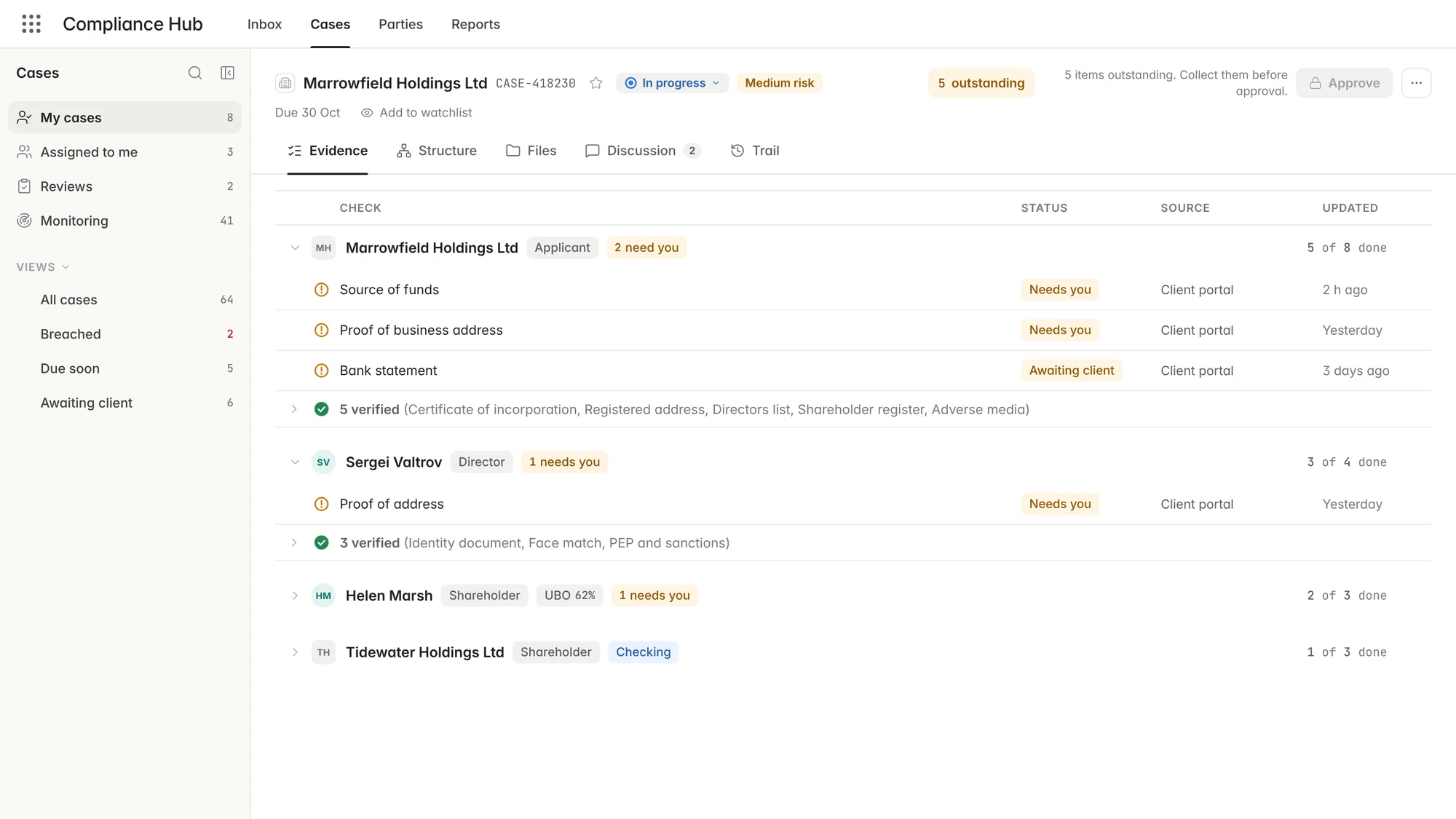
Evidence holds every party and the checks each one needs.
More about evidence and approval · Watch: Work the Evidence (0:48)Want the whole day, hour by hour? See it as an analyst or team lead or as an MLRO.
Runs every step
For your developers
Zenoo Platform
Journeys, checks and rules run on the platform that fills the case. Your developers connect it through the API and webhooks. Your compliance team works from the case.
The questions we hear first
FAQs
Yes. Applications arrive from your own onboarding through the API, with their checks, and results land on the case they belong to.
Sanctions, PEP, and adverse media screening, identity and document checks, and company registries, including Companies House for ownership. Browse the marketplace by country and check.
Yes. Keep the providers you have and add others. Results come back in one standard format whichever provider ran the check, so you can change provider without changing your own systems.
Data is encrypted with AES-256 at rest and TLS 1.3 in transit, with data residency in the EU, the UK, or the US. Trust and security.
No. Zenoo suggests, your team decides. Every suggestion shows the evidence and the source it came from, and nothing is cleared until a person clears it.
Approve stays locked while anything is outstanding, and pressing it lists each open check by the person it belongs to. A hard-stop watchlist entry blocks approval until a second Financial Crime user agrees.
Yes. Bring us a case and we will run it through Zenoo while you watch. 30 minutes. Your data. No slides.
Bring a real case from your queue. We work it with you in Zenoo, from the first screening hit to the decision and the record.
30 minutes. Your data. No slides.